
11. SysEx and TX81Z Integration
Synth81Z imports hardware Voices, Performances, and tables, and sends edits back. Automatic mirroring is active while direct MIDI OUT is open. Transmission is not limited to pressing Dump; read this chapter before connecting.
11.1 Connection and Preparation
Connect interface MIDI OUT → TX81Z MIDI IN, and TX81Z MIDI OUT → interface MIDI IN. Separate audio cables are required to hear the hardware. MIDI does not carry audio.
- Back up the hardware banks and UTILITY data you need to retain.
- Enable Exclusive reception on the TX81Z and check its basic receive channel.
- Open the MIDI icon to the right of SYSEX in Synth81Z and select the connected MIDI IN / OUT ports.
- Allow time for connection recognition. Release the ports from other applications if they are occupied.
With both directions connected, replies can establish the basic receive channel and hardware state. The transmit channel is not necessarily the basic receive channel. Check the latter especially when using output only.
11.2 Automatic Mirroring
| Action | Hardware destination |
|---|---|
| Single Voice parameter edit | Voice parameter change |
| Loading a Voice or switching to SINGLE | Single edit buffer |
| Loading a Performance or switching to PERFORMANCE | Performance edit buffer |
| Supported mixer part / common edits | Performance parameter changes |
| Master Tune | SYS TUNE |
| Editing / loading user tuning, Chord, or Program Change tables | Corresponding table bulk data |
| TX81Z-compatible SysEx received through host MIDI input | Applied locally and forwarded to direct OUT |
Automatic Performance mirroring does not write all embedded part Voices to the hardware I bank. Use Send Performance to TX81Z… (§11.5) for that. Local Voice selection and Own LFO are among the actions that do not map to one hardware parameter.
Caution: mode switching can change hardware settings
With working IN / OUT, mode synchronization uses the hardware PLAY operation and its replies. With OUT only, or when PLAY replies cannot be confirmed, PGM CHANGE SW is changed to com, and Program Change table entry 128 is overwritten with PF1 / I01. These changes are not automatically restored. Record the original settings first if you need to restore them afterward.
Master Tune is sent once when OUT opens and again after value changes. As a SYS setting, it moves the hardware display to UTILITY. Table transmission may turn Memory Protect Off when needed. Re-enable protection on the hardware afterward if required.
Loading a Performance or switching tabs alone does not send all UTILITY tables. Explicit transmission, or editing/loading a table, applies them.
11.3 Importing Files or Hardware Data
Import changes with Single / Performance mode.
- From file: Select
.syx/.midcontaining TX81Z SysEx, then choose a destination. The data is converted to Voice or Performance library files. - From hardware bank: Request the Voice or Performance bank and write it to the library.
- Current hardware Voice / Performance: Read the edit buffer into the current editing state.
Reading the current edit buffer replaces unsaved local edits. Save them first. Wait for completion or an error rather than repeatedly requesting dumps.
Receiving a Performance from the hardware requires both direct MIDI IN and OUT. After reading its settings, Synth81Z selects the Voices referenced by all eight parts on the TX81Z in turn and requests each Voice dump. The sound data and ten-character names are embedded in the .81p. Importing a Performance bank repeats this for PF01–PF24 and takes several minutes.
The process temporarily changes hardware Voice selection and Program Change settings, then restores the original settings and edit buffers. Avoid operating the hardware during reception. If you cancel, wait for restoration to finish. An incomplete Performance is not applied or saved when acquisition fails.
Importing from a file does not request Voices from the hardware. A Performance file alone may not provide its referenced Voice data. Performances with unresolved Voices are skipped; use hardware reception to obtain them. Raw hardware ROM A–D data is not bundled with the product.
11.4 Exporting Exchange Files
Export writes the current Voice / Performance as a MIDI file for hardware exchange. Use normal Save to preserve the Effects rack and software extensions.
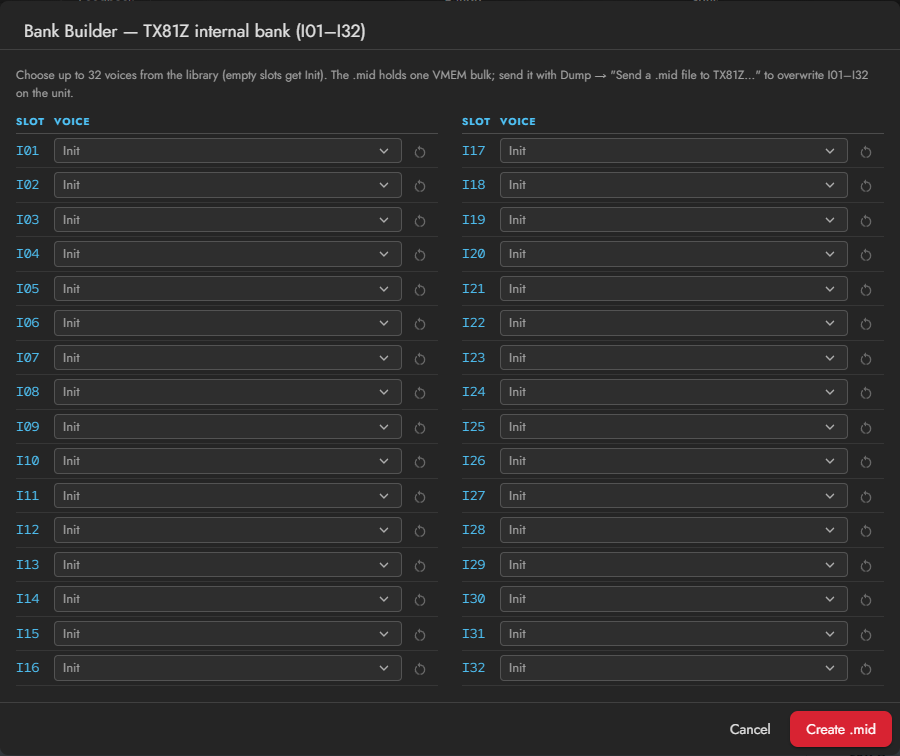
Single's Bank Builder assigns Voices to 32 I01–I32 slots and creates one bank .mid. Empty slots become Init. This does not automatically preserve the hardware's current contents in those slots.
11.5 Sending to Hardware
Current Voice
Single Dump → current Voice to TX81Z sends to the edit buffer. It does not permanently store an internal Voice slot. Use the hardware's store operation if you want to keep it there.
Performance
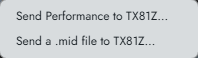
Performance Dump → Send Performance to TX81Z… requires both direct MIDI IN and OUT.
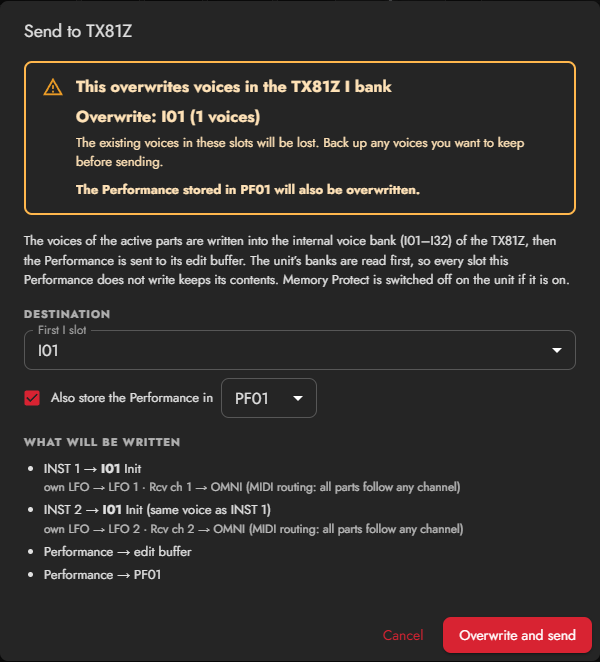
The Performance's Voices are written to the hardware I bank. Existing Voices in the destination slots are replaced. Back up any I-bank Voices you want to retain before sending.
- Choose the first I slot.
- Optionally choose a PF slot to store the Performance.
- Review What will be written, including part-to-I-slot assignments and converted settings.
- Check the highlighted overwrite destinations, click Overwrite and send, and wait for completion.
Caution: hardware memory is overwritten
The selected I slots are replaced. If PF storage is selected, that PF slot is replaced too. The plug-in reads current banks before writing and preserves unrelated slots, but not the contents of the selected destinations. Back up first. Even without PF storage, the part Voices are written to the I bank.
Sending .mid / .syx
File Dump sends the SysEx contained in the file. Banks and UTILITY data can replace the corresponding hardware memory. Check the file's contents and destination before sending.
11.6 Differences on Hardware
| Synth81Z feature | Hardware conversion |
|---|---|
| More than eight allocated Voices | Proportional allocation to eight slots, at least one per active part |
| Continuous Pan | Output I / I+II / II positions |
| Mute | Output Off |
| Own LFO | Shared LFO for the first / second active parts; Vib approximation for later parts |
| MIDI All | Receive channels set for all-channel reception |
| Solo | Temporary audition, not a stored hardware setting |
| Effects rack / Patch Volume / Master Volume | Not applied on the hardware |
Polyphony, modulation, and stereo placement may change. Keep the original .81p, review the preview, and listen to the hardware result.
11.7 Troubleshooting Communication
Check cable directions, selected ports, Exclusive, basic receive channel, and port ownership. Completion of an output-only operation does not prove that the hardware accepted the data.
Close direct OUT when you no longer want to edit the hardware. Otherwise, later preset loads and tab changes continue to mirror.