
12. Settings and Processing Load
12.1 Master Tune
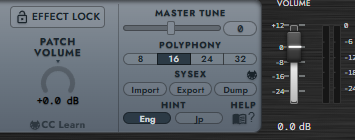
MASTER TUNE adjusts overall tuning from -64 to +63, centered at 0. Each step is 1/64 semitone, approximately 1.5625 cents. It is separate from the semitone transposition of Voice Transpose or Performance Shift.
Master Tune is not saved in Voice / Performance files. With direct MIDI OUT open, connection and value changes send SYS TUNE, moving the hardware display to UTILITY.
12.2 Polyphony
The default is 16 voices.
POLYPHONY selects 8 / 16 / 24 / 32 simultaneous voices. Eight corresponds to the hardware scale; higher values are software extensions and increase processing load.
Keep the Performance Voices total within this limit. Reducing Polyphony below the allocation makes all parts silent and prevents saving. Reduce Voices or raise Polyphony to recover. Polyphony is not stored in presets.
12.3 Master Volume and Patch Volume
PATCH VOLUME (-12 to +12 dB) matches levels between Voices / Performances. It follows Effects and precedes Master Volume. It is saved with the preset; EFFECT LOCK prevents preset loading from changing it.
The rightmost VOLUME (Master Volume, -30 to +12 dB) is final instance gain. Its default is 0 dB and it is not stored in presets. Reduce output when the meter runs high and check the DAW for clipping.
Part Volume, MIDI CC7, and operator Output also affect level. Modulator Output changes timbre too, so use Patch Volume for simple preset-level matching.
12.4 Display, Language, and Help
Resize using the lower-right grip. Window size is saved for your user environment. HINT Eng / Jp changes the hint language. HELP opens the PDF or online manual.
12.5 Reducing CPU Load and Dropouts
Try fewer simultaneous voices, bypassing or disabling unnecessary effects, and increasing the host/audio device buffer size. Mute does not reduce a Performance part's allocation; set unused part Voices to 0.