
7. Tone Parameter Reference
This chapter is a parameter-by-parameter reference for the controls laid out in the Tone (sound) editor. In Synth-80, a single Tone is a collection of many parameters, and Upper and Lower each have their own independent Tone. Here they are organized so that you can look them up in the order they appear on screen and in signal-path order.
As a rule, each parameter is explained in the following three points.
- What it changes — the target that the knob or switch controls.
- When it takes effect — the conditions under which the effect appears (waveform, mode, or dependencies on other parameters).
- Common things to watch out for — behavior specific to the real MKS-80, or points that are easy to misunderstand.
When you click each label in the plugin, a popover with the same gist as this chapter appears. Think of this chapter as a slightly more detailed version of those popovers.
Note The section colors on screen have meaning. Almost all of the parameters covered in this chapter belong to white = Tone (the Upper / Lower sound). A few parameters that are placed near the Tone editor are actually light blue = Patch scope (performance / layer). Those are covered in → Chapter 8 "Patch / Performance Reference". For the meaning of the colors, see → Chapter 5 "Understanding Preset / Patch / Tone".
7.1 LFO-1
LFO-1 is a low-frequency oscillator used to modulate the sound periodically. The modulation you create here is sent to VCO pitch (vibrato), VCF (wah), VCA (tremolo), and PWM (pulse-width wobble). The amount sent to each destination is set by the parameter at that destination (VCO Mod LFO / VCF LFO Amount / VCA LFO / PWM).
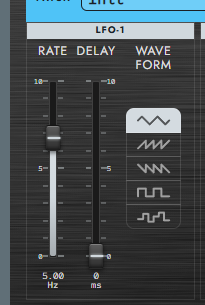
Rate (LFO-1 speed)
- What it changes: the frequency of LFO-1 (the speed of the modulation).
- The higher the value, the faster it modulates; the lower the value, the slower.
The small SYNC button below Rate switches the Rate control between two modes.
| Mode | Meaning |
|---|---|
| SYNC off | Free-running rate in Hz, as on the original MKS-80. |
| SYNC on | Host-tempo sync. The fader selects a note value from 8/1 to 1/64T, and the readout shows both the note value and the effective Hz at the current BPM. |
In tempo sync, one LFO cycle equals one selected note value. For example, at 120 BPM, 1/4 is 2.00 Hz and 1/8 is 4.00 Hz. If no host tempo has been received, Synth-80 uses 120 BPM as the fallback.
Turning SYNC off restores the previous free Hz Rate; switching modes does not overwrite the free-rate setting. When SYNC is on, the LFO phase is reset to the start of the cycle on the first note from silence and when you change the note value. Additional notes played while a sound is already active do not retrigger the phase, so layered or legato playing stays on the same tempo grid.
Wave (LFO-1 waveform)
- What it changes: the output waveform of LFO-1. The waveform changes the character of the modulation.
| Option | Meaning |
|---|---|
| Triangle | Triangle wave. Rises and falls smoothly — the most natural, plain modulation. |
| Saw Up | Sawtooth (rising). Rises slowly, then snaps back down. |
| Saw Down | Sawtooth (falling). Snaps up, then falls slowly. |
| Square | Square wave. Alternates between two values — a trill / gate-like modulation. |
| Random | Sample & hold. Each LFO cycle jumps to a new random value and holds it. |
Note Random is not a "random waveform" but a sample & hold. The value is updated each cycle as determined by Rate, and is held at a constant value in between. It is well suited to sound-effect uses that randomly jump pitch or VCF.
Delay (rise delay from Key On)
- What it changes: at Note On, the time over which the LFO amplitude rises from 0.
- Raising the value means there is no modulation the instant you press the key, and the modulation gradually rises as you hold the note. This can be used for a human-like expression where the start of a note is straight and vibrato comes in naturally on long tones.
- When SYNC is on: Delay still controls the fade-in of the LFO modulation; only the LFO speed itself is derived from the selected note value and host BPM.
7.2 VCO MOD (modulation to the VCO)
This section gathers the modulation amounts and polarities for sending LFO-1 and ENV-1 to VCO pitch. It creates motion such as wobbling the pitch (vibrato) or changing the pitch over time (pitch envelope).
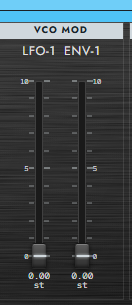
VCO Mod LFO (LFO-1 → VCO pitch modulation amount)
- What it changes: the depth at which LFO-1 modulates VCO pitch (= the depth of vibrato).
- When it takes effect: which VCO it is actually applied to, and with what polarity, is determined by VCO-1 Mod Mode / VCO-2 Mod Mode (NRM / OFF / INV), described later. If both VCOs are OFF, raising this knob applies no modulation.
VCO Mod ENV-1 (ENV-1 → VCO pitch modulation amount)
- What it changes: the depth at which ENV-1 modulates VCO pitch (= the pitch jump / dip at the start of a note).
- When it takes effect: as with VCO Mod LFO, the ON/OFF and polarity per VCO are determined by VCO-1 / VCO-2 Mod Mode.
7.3 PWM (Pulse Width Modulation)
The PWM block is the section for setting the duty cycle (pulse width) of the pulse wave statically, or driving it with a modulation source.
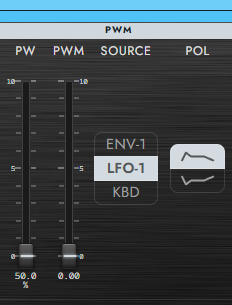
Caution PW / PWM take effect only when the VCO waveform is Pulse. When Triangle / Sawtooth / Square / Noise is selected, moving these does not change the sound.
PW (Pulse Width)
- What it changes: sets the duty cycle of the pulse wave manually ("50–0%").
- Fader direction: bottom = 50% (= Square = square wave), top = 0% (zero width = toward silence). The closer to 0%, the thinner the sound, and at the very top it becomes silent.
- When it takes effect: valid only when Pulse is selected.
PWM (Pulse Width Modulation amount)
- What it changes: the depth at which the modulation source chosen with PWM Sel (ENV-1 / LFO-1 / KBD) moves the pulse width.
- When it takes effect: valid only when Pulse is selected.
PWM Sel (Source: modulation source)
- What it changes: selects the source that modulates the pulse width. The depth is set by PWM Amount, and the sign by PWM POL.
| Option | Meaning |
|---|---|
| ENV-1 | Varies PW over time with ENV-1. |
| LFO-1 | Moves PW periodically with LFO-1 (produces a wobbling thickness). |
| KBD | Moves PW according to keyboard position (pitch). |
PWM POL (Polarity)
- What it changes: switches the sign (direction) of the PWM modulation.
| Option | Meaning |
|---|---|
| NRM | Normal polarity. |
| INV | Inverted. |
7.4 KEY FOLLOW
This section determines how the VCO module changes according to keyboard height (the pitch of the note you play).
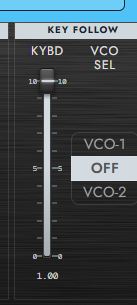
VCO Key Follow (keyboard tracking amount)
- What it changes: how much VCO pitch tracks the keyboard. At 100% it is 1V/oct (= the normal musical scale); at 0% it is fixed pitch (changing the key does not change the pitch).
- When it takes effect: the target VCO is chosen with VCO Sel.
VCO Sel (Key Follow target)
- What it changes: selects which VCO the VCO Key Follow knob is applied to.
| Option | Meaning |
|---|---|
| VCO-1 | Only VCO-1 tracks by the knob value. VCO-2 is fixed at 100%. |
| OFF | Both VCOs are fixed at 100% (= the knob is disabled). |
| VCO-2 | Only VCO-2 tracks by the knob value. VCO-1 is fixed at 100%. |
7.5 VCO-1
VCO-1 is the first oscillator. It sets the waveform and octave (Range). It is an MKS-80 spec that VCO-1 has Square but not Noise (the selectable waveforms are asymmetric with VCO-2).
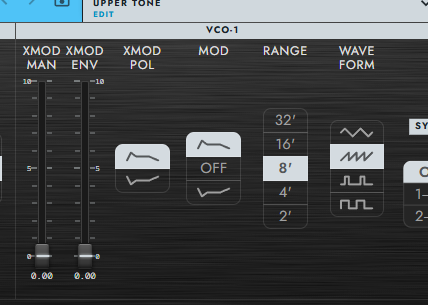
Cross Mod (XMOD: VCO-2 modulating VCO-1)
Cross Mod (cross modulation) is a feature that modulates the pitch of VCO-1 with the output waveform of VCO-2 (linear FM). The more you raise it, the more harmonics are added, producing a metallic, dissonant sound. Together with VCO Sync (→ 7.7), it is at the core of bell-like, metallic, and sharp lead sounds. Because the motion is large and the sound easily breaks up, it is safe to start with a small amount.
XMOD MAN (Cross Mod Manual amount)
- What it changes: the static depth of the amount by which the VCO-2 output waveform modulates VCO-1 pitch (linear FM).
- The more you raise it, the more harmonics are added, producing a metallic, dissonant sound.
XMOD ENV (Cross Mod Envelope Amount)
- What it changes: the depth at which ENV-1 varies the Cross Mod amount over time.
- You can create motion such as making only the start metallic, then having it decay.
XMOD POL (Polarity)
- What it changes: switches the sign of Cross Mod (the VCO-2 → VCO-1 linear FM).
| Option | Meaning |
|---|---|
| NRM | Normal polarity. |
| INV | Inverted. When VCO-2 swings positive, VCO-1 pitch goes down. |
Mod Mode (LFO/ENV receive polarity)
- What it changes: with what polarity VCO-1 pitch receives modulation from LFO-1 / ENV-1. The modulation amount itself is set by LFO / ENV-1 in the VCO Mod section.
| Option | Meaning |
|---|---|
| NRM | Normal polarity. |
| OFF | Cuts LFO / ENV modulation to VCO-1. |
| INV | Inverted polarity. Setting VCO-2 to NRM makes the two VCOs receive modulation in opposite phase. |
Range (Octave / Foot)
- What it changes: selects the octave of VCO-1 in feet.
- Relative to 8', 32' = two octaves down and 2' = two octaves up.
Wave (waveform)
- What it changes: the oscillating waveform of VCO-1. The waveform determines the amount of harmonics and greatly changes the texture of the sound.
| Option | Meaning |
|---|---|
| Triangle | Triangle wave. Few harmonics, a round sound close to a sine wave. |
| Sawtooth | Sawtooth wave. Rich in harmonics — a bright, flashy basic waveform. |
| Pulse | Pulse wave. The duty cycle is set by PW / PWM, and the timbre changes with the ratio. |
| Square | Square wave. A pulse wave fixed at a 50% duty cycle. A hollow sound. |
7.6 VCO-2
VCO-2 is the second oscillator. Unlike VCO-1, it has Noise but not Square. It also adds LOW / HI extensions to Range and a Fine Tune control.
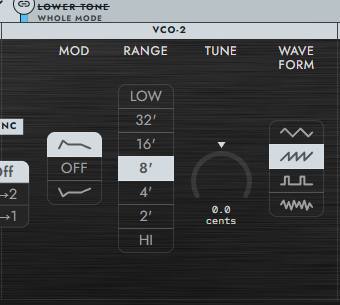
Mod Mode (LFO/ENV receive polarity)
- What it changes: with what polarity VCO-2 pitch receives modulation from LFO-1 / ENV-1.
| Option | Meaning |
|---|---|
| NRM | Normal polarity. |
| OFF | Cuts modulation to VCO-2. |
| INV | Inverted polarity. Setting VCO-1 to NRM makes the two VCOs receive modulation in opposite phase. |
Note Setting one to NRM and the other to INV, then raising VCO Mod LFO, makes the two oscillators wobble in opposite directions. Combined with detuning, this creates a wide, swirling beat.
Range (Octave / Foot + LOW / HI)
- What it changes: selects the octave of VCO-2. In addition to 32'–2', it has LOW (about four octaves below 8') and HI (about four octaves above 8').
- Both track the keyboard at 1V/oct.
- Typical use: with LOW, pitch drops down into the sub-audio range (a few Hz) at the low end, so it can be used not only as an audible bass but also as a pitch-tracking modulation source (such as the swirl in Cross Mod). At the high end it becomes a normal audible bass.
Fine Tune
- What it changes: fine-tunes the pitch of VCO-2 by ±50 cents.
- Detuning it slightly from VCO-1 produces a beating (waver) and thickness.
Wave (waveform)
- What it changes: the oscillating waveform of VCO-2.
| Option | Meaning |
|---|---|
| Triangle | Triangle wave. Few harmonics, a round sound close to a sine wave. |
| Sawtooth | Sawtooth wave. Rich in harmonics — a bright, flashy basic waveform. |
| Pulse | Pulse wave. The duty cycle is set by PW / PWM. |
| Noise | Digital pseudo-random noise. A texture with a slight graininess. |
7.7 VCO Sync (hard sync)
VCO Sync (hard sync) is a feature where, each time one VCO (Master) completes one cycle, the waveform phase of the other (Slave) is forcibly reset. The control (the Off / 1→2 / 2→1 selector) is placed at the boundary between VCO-1 and VCO-2.
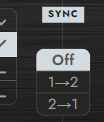
- What it changes: the direction of the hard sync. Each cycle of the Master, the phase of the Slave is forcibly reset.
- Typical use: moving the Slave's pitch (Range / Fine Tune) or its modulation produces the sharp harmonic sweep characteristic of sync. Together with Cross Mod (→ 7.5 VCO-1), it is at the core of bell-like, metallic, and sharp lead sounds. Because the motion is large and the sound easily breaks up, it is safe to start with a small amount.
| Option | Meaning |
|---|---|
| Off | Sync disabled. |
| 1→2 | VCO-1 = Master, VCO-2 = Slave. |
| 2→1 | VCO-2 = Master, VCO-1 = Slave. |
7.8 MIXER
MIXER is the block that handles the volume balance of the two VCOs.
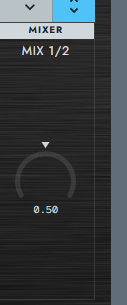
Mix (VCO-1 / VCO-2 balance)
- What it changes: the volume balance between VCO-1 and VCO-2.
- At 0, only VCO-1; at 100, only VCO-2; in between, the two are crossfaded.
7.9 HPF
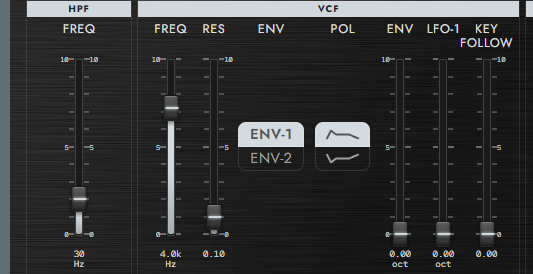
Freq (fixed-Q high-pass filter)
- What it changes: the cutoff frequency of the high-pass filter placed before the VCF. It removes the lower-frequency components.
- Common things to watch out for: it has no resonance. It is a filter for "tidying up the low end" rather than for coloring. This module does not exist on the Jupiter-6 and is a module unique to the MKS-80. Use it when you want to tighten up a sound whose bass swells and feels sluggish.
7.10 VCF
The VCF (voltage-controlled filter) is a 24 dB/oct low-pass filter. This is where the brightness and thickness of the sound are determined.
Freq (filter cutoff)
- What it changes: the cutoff frequency of the 24 dB/oct low-pass filter. It is the central parameter that defines the synthesizer's timbre.
- The higher you raise it, the more highs pass through for a bright sound; the lower you set it, the more highs are removed for a dark, muffled sound.
Resonance (filter resonance)
- What it changes: the amount of resonance that emphasizes the region around the cutoff. Raising it produces a characterful peak (a nasal-sounding resonance).
- Common things to watch out for (Rev 4 spec): because Synth-80 is based on a Rev 4 unit, raising Resonance to near maximum makes it self-oscillate, and the filter itself emits a sine-wave-like tone.
Caution Raising Resonance can increase the volume, and in the self-oscillation range the filter itself begins to sound. Watch the Master Volume.
Env Sel (filter-driving EG selection)
- What it changes: selects the envelope that moves the VCF cutoff.
- Common things to watch out for: because ENV-2 is hard-wired to the VCA, selecting ENV-2 makes VCF and VCA move with the same shape (filter and volume share the same shape).
| Option | Meaning |
|---|---|
| ENV-1 | Moves the VCF with ENV-1 (independent of the VCA's envelope). |
| ENV-2 | Moves the VCF with ENV-2 (= the same shape as the VCA). |
Env POL (ENV polarity)
- What it changes: switches the sign of VCF Env Amount.
| Option | Meaning |
|---|---|
| NRM | The filter opens as the ENV rises (cutoff increases). |
| INV | The filter closes as the ENV rises (cutoff decreases). |
Env Amount (filter ENV modulation amount)
- What it changes: the depth at which the ENV chosen with Env Sel modulates the VCF cutoff.
- When it takes effect: the polarity is set by Env POL. This is the part that sets the depth of what is commonly called the "filter envelope".
LFO Amount (LFO-1 → VCF modulation amount)
- What it changes: the depth at which LFO-1 modulates the VCF cutoff (= a wah-like periodic wobble of brightness).
Key Follow (keyboard tracking amount)
- What it changes: how much the VCF cutoff tracks the keyboard. At 100% it is 1V/oct (higher keys are brighter); at 0% it is independent of keyboard position (the same cutoff for any key).
- Raise it when you want to keep higher notes from sounding muffled by maintaining their brightness.
7.11 VCA
The VCA (voltage-controlled amplifier) is the module that controls volume. Its variation over time is always created by ENV-2.
Caution On the MKS-80, the VCA is fixed to ENV-2 drive. You cannot drive the VCA from ENV-1. When you want to change the "shape of the volume (ADSR)", operate ENV-2.
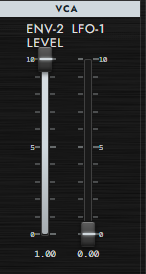
Level (ENV-2 → VCA reference level)
- What it changes: the maximum gain at which ENV-2 drives the VCA. At 0 it is muted; at 100 it opens fully.
- When it takes effect: the volume change from velocity is multiplied separately by Dynamics Level (see 7.12 of this chapter).
VCA LFO (LFO-1 → VCA amplitude modulation amount)
- What it changes: the depth at which LFO-1 modulates the VCA gain (= the depth of tremolo).
- When it takes effect: the LFO's waveform, speed, and Delay are set in the LFO-1 section (see 7.1 of this chapter).
7.12 DYNAMICS
DYNAMICS is the block that gathers how the envelopes respond to velocity (how hard you play the keyboard). It sets the velocity-response ON/OFF for ENV-1 / ENV-2 each, and how they respond (Time / Level).
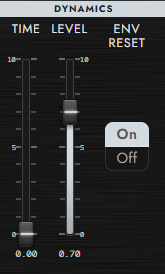
Dynamics Time (velocity → Attack shortening amount)
- What it changes: the amount by which a higher velocity speeds up the ENV Attack.
- When it takes effect: applies only to envelopes whose DYN is ON.
Dynamics Level (velocity → ENV peak intensity)
- What it changes: the amount by which a higher velocity raises the ENV peak value.
- When it takes effect: applies only to envelopes whose DYN is ON. When EG-2 DYN is ON, this determines the velocity response of the volume (because ENV-2 drives the VCA).
ENV Reset (envelope retrigger behavior)
- What it changes: whether the envelope restarts from 0 on each Note On.
| Option | Meaning |
|---|---|
| ON | Restarts the ENV from 0 on each Note On. |
| OFF | Continues from the current value (does not retrigger). |
Note The overall velocity sensitivity can also be adjusted separately with Master Dynamics Sens in Settings. That is a global setting that acts multiplicatively with the individual DYN Time / DYN Level. For details, see → Chapter 12 "Settings and Performance".
7.13 ENV-1
ENV-1 is one of the envelope generators (ADSR), used to move timbre or pitch rather than volume. Its destinations are the VCF (when Env Sel = ENV-1) / VCO pitch / PWM / XMOD.
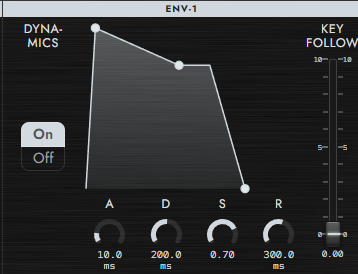
Dynamics (whether to make ENV-1 velocity-responsive)
- What it changes: whether ENV-1 responds to velocity.
- When ON, Dynamics Time / Level affect ENV-1; when OFF, velocity is ignored.
Attack (attack time)
- What it changes: the time for ENV-1 to reach its peak value from 0 after Note On.
Decay (decay time)
- What it changes: the time for ENV-1 to fall from the peak value to the Sustain level.
Sustain (sustain level)
- What it changes: the level ENV-1 holds from the end of Decay until Note Off.
Release (release time)
- What it changes: the time for ENV-1 to fall from its current value to 0 after Note Off.
Key Follow (keyboard-based Attack / Decay / Release shortening)
- What it changes: the degree to which the whole of ENV-1 (Attack / Decay / Release) becomes faster on higher keys, like a piano.
- This is the same parameter as "EG-1 Key Follow" in the KEY FOLLOW section (see 7.4 of this chapter).
7.14 ENV-2
ENV-2 is the other envelope (ADSR), hard-wired to the VCA. In other words, ENV-2 determines the variation of volume over time (the volume curve). When you select Env Sel = ENV-2, the VCF also moves with the same shape.
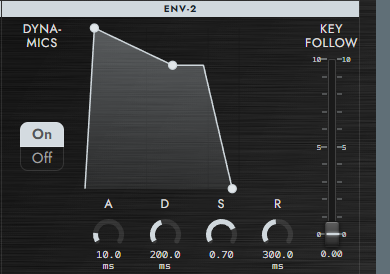
Dynamics (whether to make ENV-2 velocity-responsive)
- What it changes: whether ENV-2 responds to velocity.
- Common things to watch out for: because ENV-2 is hard-wired to the VCA, this switch determines whether the volume responds to velocity. Setting it OFF makes the volume constant no matter how hard you play.
Attack (attack time)
- What it changes: the time for ENV-2 to reach its peak value from 0 after Note On. Short is a sharp start of the note; long is a soft, gradual rise.
Decay (decay time)
- What it changes: the time for ENV-2 to fall from the peak value to the Sustain level.
Sustain (sustain level)
- What it changes: the volume level ENV-2 holds from the end of Decay until Note Off.
Release (release time)
- What it changes: the time for ENV-2 to fall from its current value to 0 after Note Off. Short cuts off abruptly; long leaves a lingering tail.
Key Follow (keyboard-based Attack / Decay / Release shortening)
- What it changes: the degree to which the whole of ENV-2 (Attack / Decay / Release) becomes faster on higher keys. Because ENV-2 drives the VCA, this mainly affects how the tail of high notes tightens up.
- It creates the behavior, like a piano, where the envelope timing tightens at the high end.
That covers the parameters on the Tone (sound) side. For performance / layer parameters (Key Mode / Balance / Glide / Bend / Aftertouch, etc., light blue = Patch scope), see → Chapter 8 "Patch / Performance Reference"; for the individual parameters of the effect chain, see → Chapter 9 "Effects".