
6. Sound Design Basics
If you are already familiar with the basic operation of a synthesizer, feel free to skip this chapter.
This chapter is a "map" to read before diving into the parameter reference in Chapter 7 and beyond. Synth-80 is a subtractive analog modeling synth. In subtractive synthesis, you first create a raw tone rich in harmonics, then carve away the unwanted components and shape how the volume and timbre change over time.
Here we will not get into the precise specifications of each individual parameter. Instead, we will follow the path of the signal as it flows, to understand "what is located where, and roughly how it sounds when you move it." The exact ranges, conditions, and cautions for each parameter are collected in Chapter 7 for the Tone side and Chapter 9 for the Effects side, so this chapter will point you there.
Note The section colors on screen carry meaning. White = Tone (the timbre of each of Upper / Lower), and light blue = Patch scope (performance / layer settings). The "creating the sound itself" parts covered in this chapter almost all belong to the white Tone sections. For details on what the colors mean, see → Chapter 5 "Understanding Preset / Patch / Tone".
6.1 The Signal Flow
A single note (one voice) in Synth-80 is built up roughly in the following order. It becomes easier to follow if you think of it as a one-way path, where the material created upstream is processed in turn by the downstream modules.
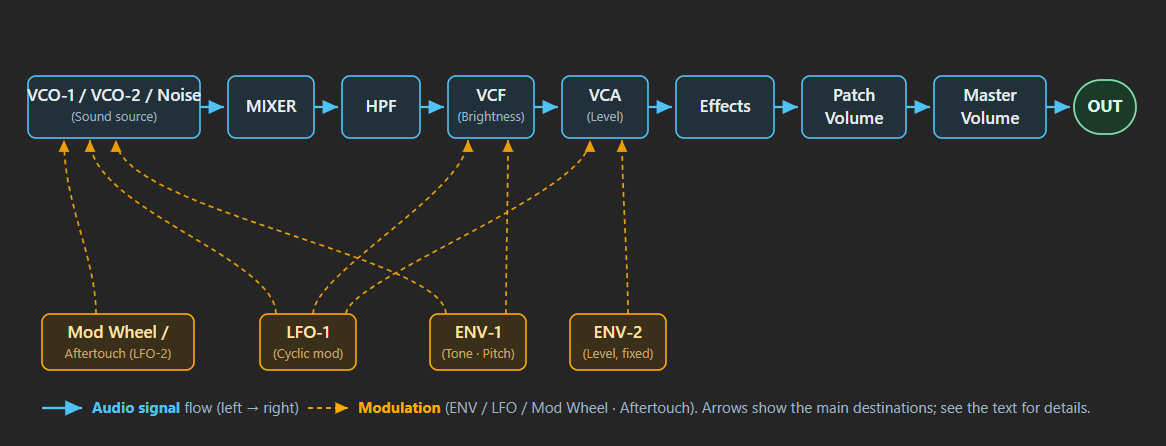
- Create the raw material — VCO-1 / VCO-2 / Noise oscillate the raw, unprocessed waveforms.
- Mix — The MIXER sets the volume balance between VCO-1 and VCO-2.
- Clean up the low end — The HPF trims away the lower components.
- Shape the brightness — The VCF (lowpass filter) trims away the higher components, determining the brightness and thickness of the sound.
- Shape the volume — The VCA applies the volume attack and decay according to the shape of ENV-2.
- Move the timbre and pitch over time — ENV-1 makes the VCF, VCO pitch, and so on change over time.
- Add periodic modulation — LFO-1 periodically modulates the VCO / VCF / VCA / PWM.
- Add expression after the note is played — Mod Wheel / Aftertouch / LFO-2 add nuance during performance.
- Finally, add space and texture — Effects (chorus, delay, reverb, etc.) finish the sound.
The following sections walk through steps 1 through 9 in order.
6.2 Creating the Raw Material — VCO-1 / VCO-2 / Noise
Everything starts from the two oscillators (VCO-1 / VCO-2). For each, you choose a waveform and set the octave (Range). The waveform determines the amount of harmonics, so this is where much of the "material character" of the sound is decided. Roughly speaking, the triangle wave is the roundest, the sawtooth is the brightest and most flamboyant, and the square / pulse waves sit somewhere in between.
The waveforms selectable on VCO-1 and VCO-2 are intentionally asymmetrical. This faithfully reproduces the specification of the real MKS-80.
| Oscillator | Selectable waveforms | Notes |
|---|---|---|
| VCO-1 | Triangle / Sawtooth / Pulse / Square | Has Square, but does not have Noise |
| VCO-2 | Triangle / Sawtooth / Pulse / Noise | Has Noise, but does not have Square |
In other words, when you want a clear square wave, use VCO-1; when you want a noise component (wind, breath, percussive textures, and so on), use VCO-2. That is how the roles are divided.
VCO-2 has a LOW / HI extension for its Range (octave), and choosing LOW lets it drop down to an ultra-slow range of just a few Hz in the lower keyboard region. In this state, VCO-2 can also be used as a second "modulation source" (combined with the Cross Mod described later, it produces an undulating sound).
Note When you think "I want it brighter," the first move is to shift the waveform toward sawtooth (Sawtooth). Conversely, for "rounder and softer," use the triangle wave (Triangle).
For the exact options and behavior of each waveform and each Range, see → Chapter 7 "Tone Parameter Reference".
6.3 Mixing — MIXER
The MIXER is the knob that sets the volume balance between VCO-1 and VCO-2. Turning it fully to one side gives you only one oscillator; setting it in the middle blends both.
Mixing two oscillators with a slight pitch offset adds thickness and undulation to the sound. The pitch of VCO-2 can be fine-tuned with Fine Tune (a classic technique when you want to fatten up a sound).
6.4 Cleaning Up the Low End — HPF
The HPF (highpass filter) is a fixed-Q highpass placed ahead of the VCF. It trims away only the lower components. It has no resonance, so it is a filter for "cleanup" rather than for adding character.
This is a module unique to the Roland MKS-80 that served as the model, and is not present on its sibling, the Jupiter-6. Use it when you want to tighten up a sound whose bass has swelled too much and become sluggish.
6.5 Shaping the Brightness — VCF (Cutoff / Resonance)
The VCF (voltage-controlled filter) is a 24 dB/oct lowpass filter. It is the part you touch most often in subtractive sound design, and it determines the brightness and thickness of the sound.
- Cutoff — The higher you raise it, the more high components pass through, making the sound brighter; the lower you set it, the more the high end is trimmed away, making the sound darker and more muffled. Almost everything from "brighter" to "darker" can be made here.
- Resonance — Emphasizes the region around the Cutoff, creating a characterful peak (a nasal-sounding ring). Because Synth-80 is calibrated to a Rev 4 unit, raising Resonance up near its maximum causes self-oscillation, where the filter itself produces a sine-wave-like tone.
The VCF is not only set statically; by moving it over time with the ENV or LFO, you can create the kind of synth-like motion where the filter sweeps open with a "vyoom" or undulates periodically (see the following sections).
Caution If you raise Resonance and set Cutoff fairly low, the sound becomes very thin and sharp. Raising it further into the self-oscillation range can make the filter itself start to ring and grow loud, so watch your Master Volume.
For the exact ranges of Cutoff / Resonance, Key Follow (keyboard tracking), and so on, see → Chapter 7 "Tone Parameter Reference".
6.6 Shaping the Volume — VCA / ENV-2
The VCA (voltage-controlled amplifier) is the module that controls volume, and ENV-2 creates the time variation (envelope) of that volume. In Synth-80, the VCA is a fixed connection always driven by ENV-2; you cannot drive the VCA from ENV-1 (this too is a specification of the real MKS-80).
ENV-2 shapes the volume curve with four parameters: Attack / Decay / Sustain / Release (ADSR).
- Attack — How quickly the volume rises after you press a key. Short gives a sharp "tick," while long gives a soft, gentle fade-in.
- Decay — The time it takes to fall from the peak to the Sustain level.
- Sustain — The volume level held while you keep the key pressed.
- Release — The time it takes for the sound to fade after you release the key. Short cuts off abruptly, while long leaves a lingering tail.
"I want a strong, sharp attack" maps directly to setting ENV-2's Attack to its shortest, and "I want the tail to linger" maps to a long Release — the words you hear translate straight into the controls.
6.7 Moving the Timbre and Pitch — ENV-1
ENV-1 is a second envelope, but this one is used to move the timbre and pitch rather than the volume. It also has an ADSR, but its destination is different.
ENV-1 can be sent to destinations such as the following.
- VCF Cutoff — The so-called "filter envelope," where the filter opens the moment you play and then closes. This is the core of the attack character of brass and bass sounds (when the driving EG is set to "ENV-1" on the VCF side).
- VCO pitch — An effect where the pitch jumps up / down at the start of the sound.
- PWM — Varies the pulse width over time.
- XMOD (Cross Mod) — Varies the depth of Cross Mod over time, animating the metallic ring.
Note For a brass-type sound that "snaps open on the attack and immediately settles," the starting point is to send ENV-1 to the VCF and set Attack short and Decay medium. The lower you set Sustain, the more the emphasis on the attack stands out.
The envelope that drives the VCF can be chosen from ENV-1 and ENV-2. Choosing ENV-2 makes the filter and the volume move with the same shape. For details on how to use these, see → Chapter 7 "Tone Parameter Reference".
6.8 Adding Periodic Modulation — LFO-1
LFO-1 is the module for modulating the sound periodically. You choose the modulation speed (Rate) and the waveform (Triangle / Saw Up / Saw Down / Square / Random), and set the depth for each destination. Rate can run freely in Hz, or it can be synchronized to the host tempo with the small SYNC button under the Rate control.
- Send to VCO → vibrato (pitch wobble)
- Send to VCF → a wah-like brightness wobble
- Send to VCA → tremolo (volume wobble)
- Send to PWM → the pulse width moves periodically, producing a shimmering thickness
Choosing the Random waveform gives a "sample & hold" that jumps to a random value once per cycle, allowing sound-effect-like uses where the pitch or filter jumps around randomly.
LFO-1 has a Delay, which can be set so the modulation rises slightly later after you press a key. You can use this for a human-like expression where the note is straight the moment you play it, and vibrato naturally comes in as you hold it. When SYNC is on, the musical rate follows the project BPM, so tremolo, filter wobble, PWM motion, and sample-and-hold jumps can lock to the song grid.
6.9 Adding Expression After the Note Is Played — Mod Wheel / Aftertouch / LFO-2
Up to this point, the motion has been "built into the patch as a fixed setting." Finally, there is the family of expression you add by hand during performance. Synth-80 has one more modulation source, LFO-2, which is triggered by the Mod Wheel (CC 1) and Aftertouch (the pressure of pressing the key down).
LFO-2 is fixed to a Triangle waveform, and as you raise the Mod Wheel or press the key down, the modulation rises in proportion to that amount. The destination can be chosen from VCO pitch (vibrato) or VCF (a brightness offset). Its Rate can also run freely in Hz or sync to the host tempo, which is useful for tempo-locked wheel / aftertouch vibrato.
Note Just as on the real MKS-80, the Mod Wheel and Aftertouch share the same bus. If you move both at the same time, the deeper one (the one with the greater amount) takes priority.
This lets you add in-performance nuance, such as raising the wheel partway through a long tone to deepen the vibrato, or pressing down hard to open the filter. For details, see → Chapter 8 "Patch / Performance Reference".
6.10 Finally, Adding Space and Texture — Effects
To the single timbre you have built up so far, you finally add space and texture with the Effects. Synth-80 has a 5-slot series effect chain, where you can freely arrange chorus, delay, phaser, flanger, EQ, compressor, distortion, reverb, and more.
From a sound-design standpoint, Effects are not "the sound itself" but "the finishing touch." For example, they serve roles such as adding chorus to a thin string sound to widen it, or adding reverb to a pad to give it depth. For the types and parameters of each effect, see → Chapter 9 "Effects".
6.11 From the Words You Hear to Which Knob to Reach For
Finally, here is a summary mapping common "I want it like this" requests to the first parameter to reach for. These are only starting points; in practice you combine several to dial in the result.
| What you want | Where to reach first |
|---|---|
| Brighter | Raise the VCF Cutoff / shift the waveform toward sawtooth |
| Darker / more muffled | Lower the VCF Cutoff |
| Fatter | Play both VCO-1 / VCO-2 and detune slightly (Fine Tune) / move the MIXER toward center |
| Sharper attack | Set ENV-2's Attack to its shortest / send ENV-1 to the VCF with a short Attack |
| Longer tail | Lengthen ENV-2's Release |
| A bright pop only at the start | Send ENV-1 to the VCF, with a medium Decay and a low Sustain |
| Add vibrato | Send LFO-1 (or LFO-2 via Mod Wheel / Aftertouch) to the VCO |
| Undulation / tremolo | Send LFO-1 to the VCF / VCA |
| Metallic / sound-effect-like | Use XMOD (Cross Mod) or VCO Sync |
| Tighten up the bass cleanly | Raise the HPF Cutoff |
| Add width / depth | Add Effects (Chorus / Reverb, etc.) |
Note XMOD (Cross Mod, where VCO-2 modulates the pitch of VCO-1) and VCO Sync (where one VCO is force-synced to the other) are the core features for bell-type, metallic, and sharp lead-type sounds. Their motion is large and the sound breaks up easily, so start with a small amount first. For details on their behavior, see → Chapter 7 "Tone Parameter Reference".
Once you have this map in your head, you will be able to read each parameter from Chapter 7 onward in terms of "what stage of the signal it operates on, and how it moves it."