
8. Performance Reference
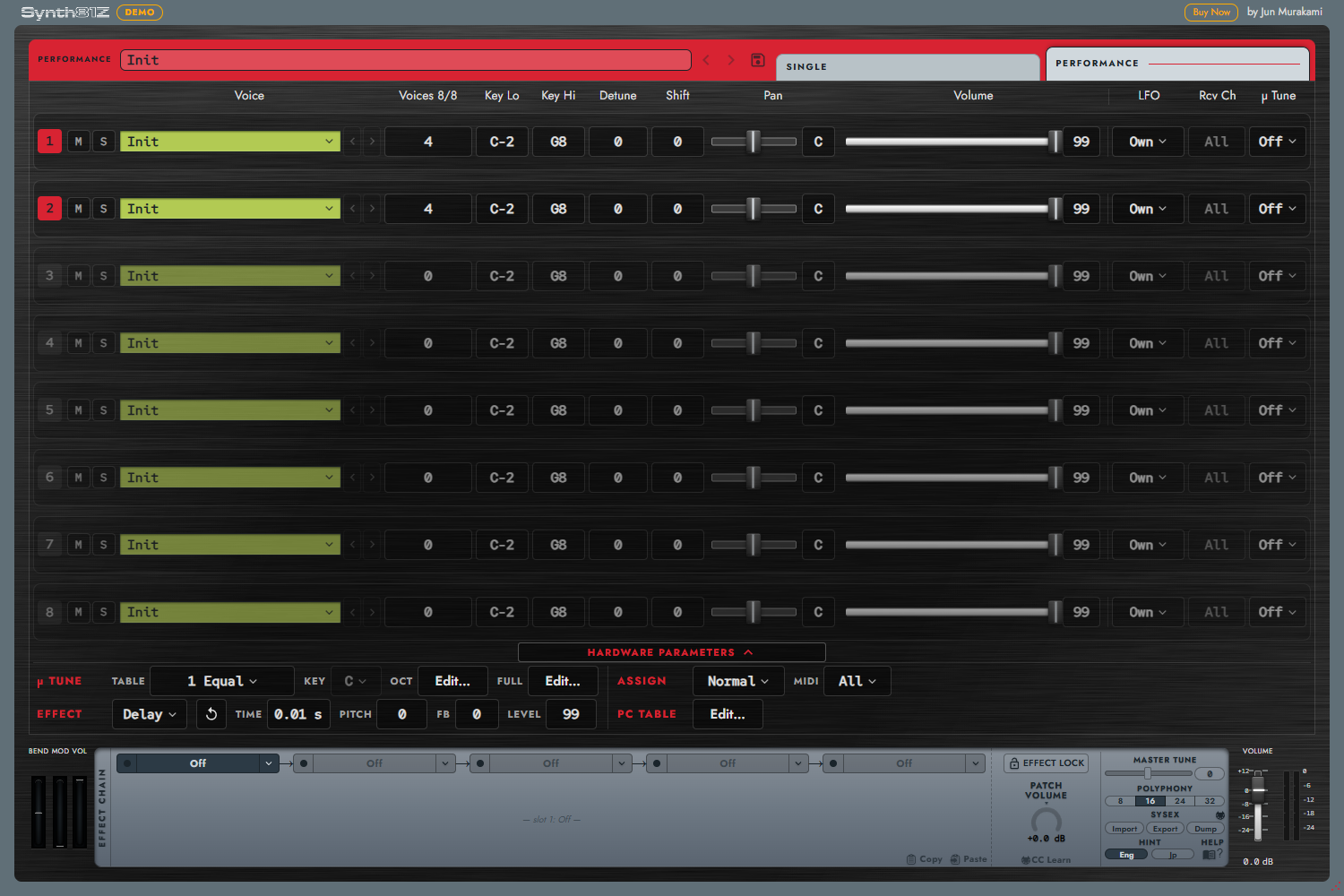
Performance combines up to eight parts. Each holds a Voice and responds according to its key range, channel, and other settings.
8.1 Layering Two Sounds
- Switch to PERFORMANCE and start from Init.
- Reduce part 1 Voices from 8 to 4, then set part 2 to 4.
- Select each row's Voice. If the library is empty, create and save a Voice in Single first.
- Set HARDWARE MIDI to All, so all parts receive all MIDI channels.
- Balance Volume and Pan, then Save an
.81pfrom the preset bar.
Voices is allocated per part. A 4+4 layer gives each sound four notes; it does not provide eight simultaneous layered keys.
8.2 Part Controls
| Column | Range / behavior |
|---|---|
| Voice | Copies a sound into the part |
| Voices | 0–32 notes; 0 disables the part. Total must fit Polyphony |
| Key Lo / Key Hi | MIDI notes 0–127, both endpoints included |
| Detune | -7 to +7, small inter-part pitch offset |
| Shift | -24 to +24 semitones |
| Pan | Continuous L100 through C to R100 |
| Volume | 0–99 |
| M | Mute output while retaining voice allocation |
| S | Audition one part; click again to release Solo |
For a split, set adjacent Key Hi / Key Lo boundaries. If both include the same boundary key, both sound there. Mute does not free Voices; lower the allocation to make it available elsewhere.
Caution: a red Voices heading
An over-capacity Performance is silent on all parts and cannot be saved. This can happen when Polyphony is reduced from 16 to 8, for example. Raise Polyphony or reduce part Voices until the total fits. While over capacity, only decreases to Voices are accepted.
When a Performance is received from the hardware, each Voice field shows the bank, number, and received name, for example “A01 Voice Name.” Names are retained in .81p files and DAW sessions. Re-import older data from the hardware to add names that were not previously retained.
8.3 Editing a Part Voice
Choose Edit in Single… in the Voice menu. Confirm that the current Single buffer will be replaced.
After editing in Single, return to PERFORMANCE and choose Use current Single voice on the target row. This transfer is explicit, not automatic. Choose Export as .81v… to save an individual part Voice.
8.4 HARDWARE: MIDI and LFO
Open HARDWARE below the mixer to reveal hardware-compatible channel settings and common settings. These parameters are part of the Performance.
MIDI All sends all channels to every part. Multi follows each part's Rcv Ch (1–16 / OMNI). To play parts from separate DAW tracks, choose Multi and match their channels.
| LFO | Meaning |
|---|---|
| Own | Independent LFO from the part's Voice; a software extension |
| Off | No LFO modulation |
| LFO 1 | Shared source from the first active part |
| LFO 2 | Shared source from the second active part |
| Vib | Hardware-derived vibrato path |
With a shared LFO, changing only your own Voice may not change the source waveform or speed. Start with Own for independent Voice behavior. Sending to hardware converts Own to supported hardware modes (Chapter 11).
Assign offers Normal / Alternate. Normal plays eligible parts together; Alternate cycles through eligible parts for alternating performance.
8.5 Micro Tuning
A part's µ Tune On uses the common Table. Off does not use it.
Choices are Oct (user) / Full (user) and 1 Equal, 2 Pure (major), 3 Pure (minor), 4 Mean tone, 5 Pythagorean, 6 Werckmeister, 7 Kirnberger, 8 Vallotti & Young, 9 1/4 Shift equal, 10 1/4 tone, 11 1/8 tone. Key applies only to presets 2–5.
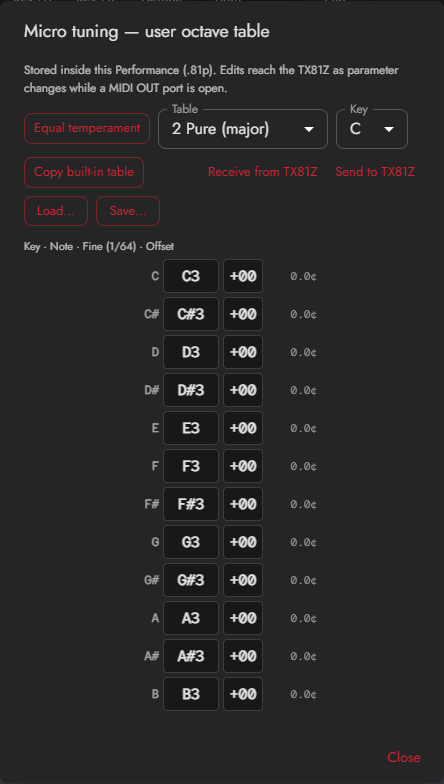
Open Edit…, or Empty… for an unset table. Oct repeats twelve tuning relationships across octaves; Full specifies each of 128 keys. Coarse selects pitch and Fine uses 1/64-semitone steps. Equal temperament provides a starting point. An unset table has no editable values yet.
Load… / Save… exchanges a table separately. Saving a Performance includes its tables. With direct MIDI OUT open, editing or loading a table also sends it to the hardware; read Chapter 11 first.
8.6 Delay / Pan / Chord
HARDWARE Effect selects one of Off / Delay / Pan / Chord. These use the hardware's note and performance processing and are included for compatibility. They are separate from the lower audio Effects rack. Selection or retrigger operations can stop sounding notes.
Delay
Repeats delayed notes. Time is 0.01–1.28 s, Pitch -24 to +24 semitones, Fb 0–7, and Level 0–99. Unlike an audio delay, it does not simply replay a recorded waveform. Its result depends on voice allocation and the sound settings.
Pan
Creates changes between hardware outputs I and II. Dir is I → II / II → I, Select is LFO / Velocity / Note, and Range is 0–99. Choose the source of the change. 3 (?) preserves an undefined received value; normally choose one of the three defined sources.
This effect depends on output assignment and part configuration. When comparing hardware behavior, use the continuous mixer Pan's reference positions L100 / C / R100.
Chord
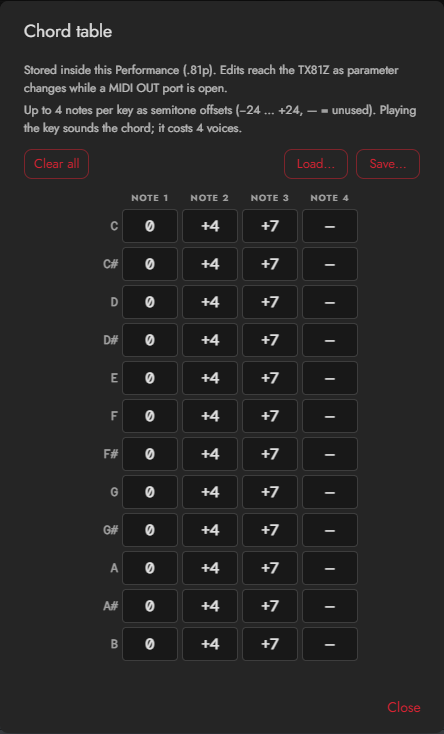
Open Edit… to assign up to four intervals per pitch class. Each is -24 to +24 semitones; — means unused. Include 0 to retain the original pitch. Allocate enough Voices for the chord. A separate table uses .81chord.
8.7 Program Change
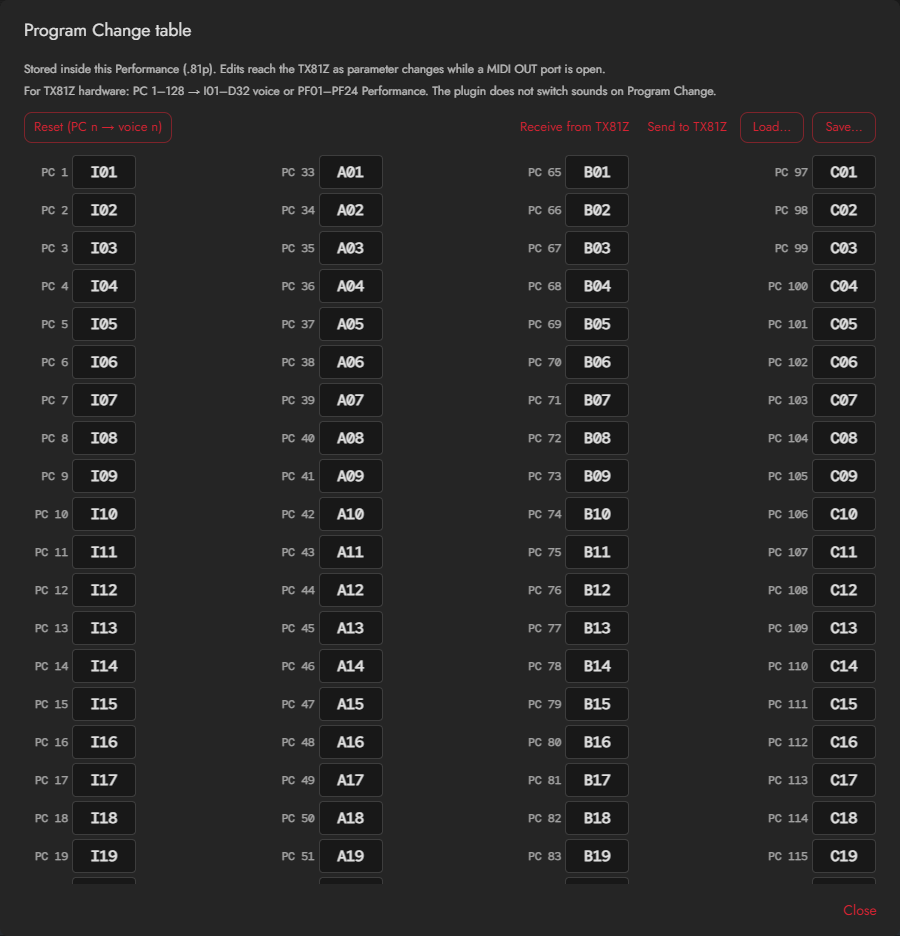
This table is for use on the connected TX81Z. The plug-in does not switch Voices or Performances in response to MIDI Program Change. There is no plug-in Receive setting.
The table maps 128 incoming numbers to I01–D32 Voices or PF01–PF24 Performances. The editor displays 1–128; MIDI data uses 0–127. Check your DAW's numbering convention if selections are off by one.
The table is included in the Performance and can be saved separately as .81pctable. Editing or loading it while direct MIDI OUT is open sends it to the TX81Z. Configure Program Change reception on the hardware itself.