
11. SysEx / MKS-80 Integration
This chapter explains how to use Synth-80 together with a real Roland MKS-80.
Synth-80 can handle MKS-80-compatible SysEx (System Exclusive) messages. With this feature you can import a real MKS-80's library into Synth-80, write tones you created in Synth-80 back to the hardware, or back up the hardware's memory as a .mid file. In addition, while connected, your operations in Synth-80 are reflected on the MKS-80 in real time, so you can also use Synth-80 as an editor for the MKS-80.
This feature is intended for users who own a real MKS-80. Even without the hardware, it has no effect on sound design in Synth-80.
Caution
Writing to the hardware's memory can cause you to lose the unit's built-in patches if the operation is performed incorrectly. Be sure to follow the procedures in this chapter, especially "make a backup beforehand," "set the PROTECT switch," and "do not unplug the cable while sending."
11.1 Setup Example
This is a typical connection example for using Synth-80 together with a real MKS-80.
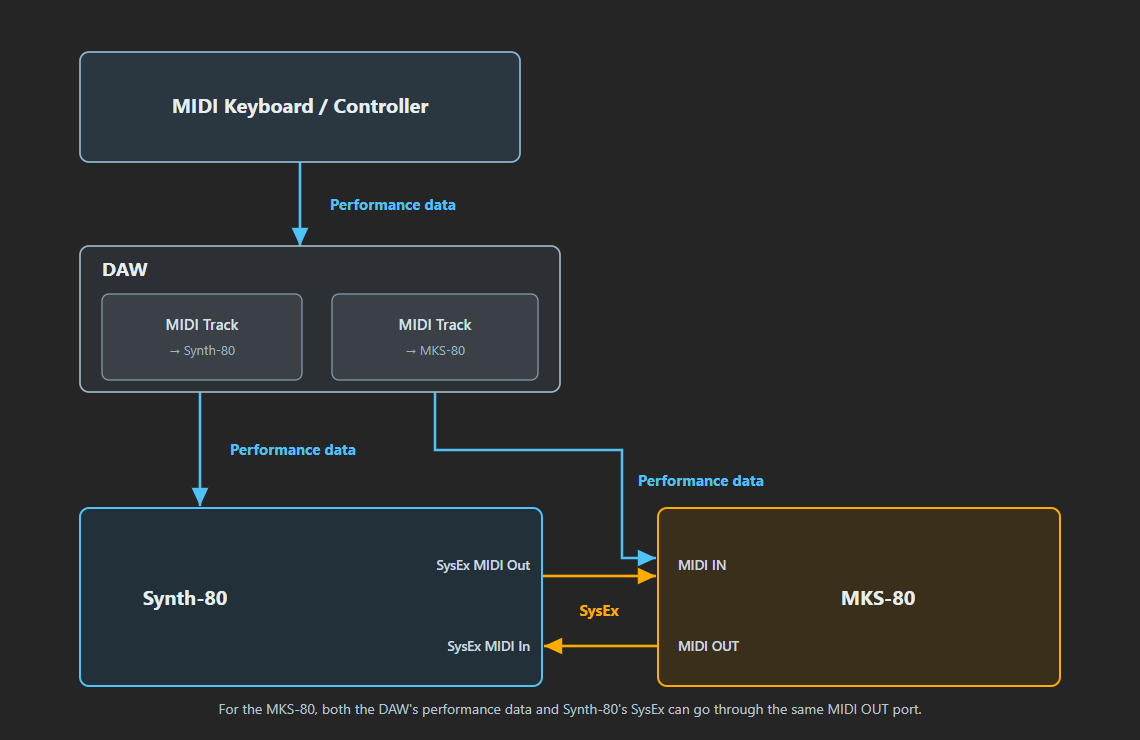
- Performance information (MIDI notes, CC, etc.) — Your playing on the keyboard reaches Synth-80 by way of the DAW.
- SysEx — Signals used to exchange patches and bulk dumps, and to remotely edit parameters, between Synth-80 and the real MKS-80. These do not pass through the DAW; they are exchanged over a dedicated MIDI port that Synth-80 opens directly.
For the wiring to the real MKS-80 itself, it is fine to send both the performance information from the DAW and the SysEx from Synth-80 to the same MIDI output → the hardware's MIDI IN. The replies from the hardware (bulk dumps, etc.) return from the hardware's MIDI OUT to Synth-80's input port.
11.2 Where the SysEx Functions Are
SysEx operations are performed from the SYSEX block at the very bottom of the screen. Below the SYSEX label are three buttons, Import / Export / Dump, and pressing each one opens a submenu. At the right edge of the label is an icon button for selecting the dedicated MIDI port.
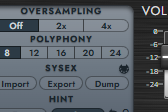
The SYSEX label is an underlined parameter hint. Clicking it displays a pop-over explaining each of the Import / Export / Dump actions.
11.3 Connecting a Real MKS-80
Why a MIDI Port Is Opened Directly
Synth-80 uses a dedicated MIDI port for SysEx communication with the real MKS-80. Rather than routing through the DAW's plugin MIDI input, the plugin opens an OS-level MIDI port directly to send and receive.
This is because many DAWs, including Cubase, do not pass SysEx that arrives at a VST straight through (they do not hand it to the plugin). To ensure reliable SysEx exchange, Synth-80 opens its own MIDI port.
Note
The dedicated SysEx port used here is a separate path from the normal MIDI input used to play Synth-80 from a DAW or keyboard, and from MIDI Learn. For MIDI Learn / automation, see → Chapter 10 "MIDI / MIDI Learn / Automation".
Selecting the Ports
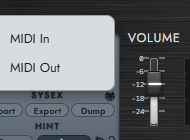
Clicking the MIDI icon at the right edge of the SYSEX label opens the MIDI Ports for MKS-80 menu. Here you select the MIDI In and MIDI Out ports respectively.
| Item | Description |
|---|---|
| MIDI In | Selects the input port that receives the real MKS-80's MIDI OUT. |
| MIDI Out | Selects the output port that sends to the real MKS-80's MIDI IN. |
For the connection, wire both directions: the real MKS-80's MIDI OUT to the computer's MIDI input, and the computer's MIDI output to the MKS-80's MIDI IN. Some operations are receive-only or send-only, but operations that involve a handshake (receiving from the hardware, writing back to the hardware) require both input and output.
11.4 Import — Bringing In from the Hardware or a File
Pressing the Import button lets you choose between the following two import methods.
| Menu item | Action |
|---|---|
| Load from file… | Loads a .mid / .syx bulk dump file from disk. |
| Receive from real MKS-80… | Sends a bulk dump request (RQF) to the hardware and receives the response. |
Both read an MKS-80 bulk dump (16 DAT = 64 patches + 64 tones) and convert it into Synth-80's Patch format (.80p). Use this when you want to migrate a real MKS-80's library to Synth-80, or to keep a .mid archive that you can write back later.
Load from File
Selecting Load from file… opens a file selection dialog. Choose a .mid or .syx file containing an MKS-80 bulk dump. The DAT messages in the file are read, converted into Patches (.80p), and written out to the library. When finished, the number of items written out and the destination folder are shown.
Files that contain no bulk dump (DAT) can still be imported if they are recordings of the patch dumps (PGR + APR) that the hardware sends when you switch patches on its front panel. Many SysEx files saved by old sequencers and librarians use this format. Each patch switch is converted into one patch, and identical duplicates are automatically collapsed into a single entry.
Note
If no MKS-80 DAT / APR message is found in the file, it cannot be imported. Check whether the file contains an MKS-80 bulk dump or patch dump. Files that only contain individual parameter changes (IPR) — e.g. recordings of knob movements — cannot be imported because they do not contain complete patches.
Receive from Real MKS-80
Selecting Receive from real MKS-80… causes Synth-80 to send a bulk dump request (RQF) to the hardware and wait for a response. The hardware's MIDI FUNCTION must be set to III (see "Preparing the Hardware" below).
A dialog is shown while receiving. When the response arrives, a dialog opens that lets you choose the save format, along with the number of DAT messages received.
| Save format | Description |
|---|---|
| Patch file (.80p) | Converts the received content into Patch files and imports them into the library. |
| MIDI file (.mid) | Saves the received content as-is as a .mid file (for backup). |
Caution
If there is no response for a certain time (about 5 seconds), it times out. If no response arrives, check the hardware's power, the MIDI cable connections (whether they are correctly connected to the plugin / Standalone MIDI IN and OUT), whether MIDI FUNCTION is set to III, and whether the MIDI channel matches the hardware's Basic Channel.
11.5 Export — Writing Out as .mid
Pressing the Export button lets you choose between the following two export methods. Export does not require the hardware; it simply creates a .mid file on disk. It can be used for general-purpose backups.
| Menu item | Action |
|---|---|
| Save current patch as .mid | Writes the currently loaded Patch out to a single .mid. |
| Create .mid with Bank Builder… | Assembles an entire memory bank (64 patches + 64 tones) into a single file. |
Save Current Patch as .mid
Writes the currently loaded Patch (Performance + Upper Tone + Lower Tone) out as a single .mid file in MKS-80 bulk (DAT) format.
The exported .mid can later be read back with Import, and can also be sent to the real MKS-80 via Dump → "Select a .mid file and dump to MKS-80".
Create .mid with Bank Builder
Selecting Create .mid with Bank Builder… opens a dedicated dialog for assembling the MKS-80's entire memory bank (64 patches + 64 tones = 16 DAT) into a single file.
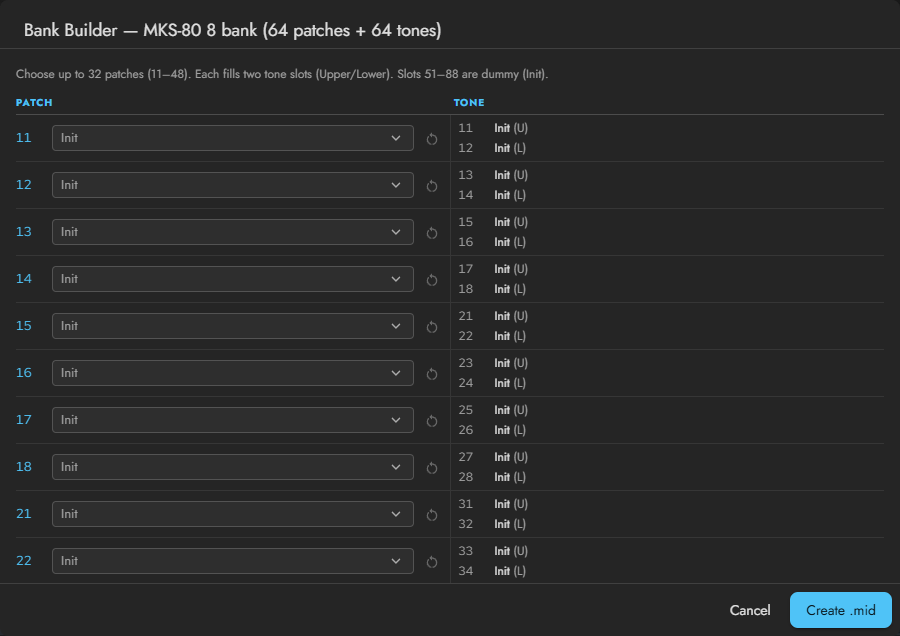
Choose up to 32 patches from the library into slots 11–48. Each patch automatically fills two consecutive tone slots with its Upper and Lower Tones. Slots 51–88 are unusable dummies (Init).
The assembled .mid can be sent as a complete bank to the real MKS-80 via Dump → "Select a .mid file and dump to MKS-80".
Note
"Patch" here refers to Synth-80's own unit of saving. For the relationship between Patch, Tone, and Upper / Lower, see → Chapter 5 "Understanding Preset / Patch / Tone".
11.6 Dump — Sending to the Real MKS-80
Pressing the Dump button lets you choose between the following two send methods. Dump is an operation that sends to the real MKS-80 over MIDI.
| Menu item | Action |
|---|---|
| Dump current patch to MKS-80… | Sends the currently loaded Patch immediately. |
| Select a .mid file and dump to MKS-80… | Loads a .mid / .syx and writes it to the hardware's memory / cartridge. |
Dump Current Patch to MKS-80
Sends the currently loaded Patch immediately to the real MKS-80 with no confirmation dialog. What is sent is the current tone (APR), and on the hardware only the edit buffer is rewritten. The hardware's built-in 64 patches and cartridge memory are not changed.
Use this when, during sound design, you want to play the sound you created in Synth-80 on the hardware on the spot.
Caution
This menu sends the moment you select it. No confirmation dialog appears. Confirm in advance that the destination is the intended hardware and port.
Select a .mid File and Dump to MKS-80
Loads a .mid / .syx bulk dump file and writes its contents to the real MKS-80's memory or cartridge. This is an operation that rewrites the hardware's stored memory itself. Use it to write back a .mid created with Export, or a backup saved as .mid with Import (Receive from the hardware).
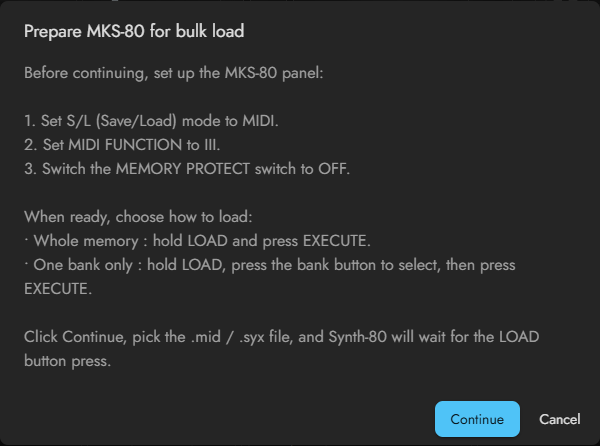
When you select this menu, a dialog first appears prompting you to prepare the hardware. Once ready, press Continue and choose the file. Synth-80 then waits for a LOAD operation on the hardware, and when you perform LOAD on the hardware, the handshake begins automatically. See the next section for the detailed procedure.
Caution
Before any operation that rewrites the hardware's stored memory, always make a backup first. We strongly recommend keeping the pre-overwrite state as a .mid using Export (Save current patch as .mid) or Import (Receive from real MKS-80 → save as .mid).
11.7 Preparing the Hardware and the Write-Back Procedure
For exchanges with the real MKS-80 that involve a handshake (receiving from the hardware, writing back to the hardware), the hardware must be set to the required state.
Preparing the Hardware
When writing a .mid file back to the hardware, Synth-80 prompts you for the following preparation. Before writing, set the hardware unit to the following state.
- Set the S/L (Save/Load) mode to the MIDI side.
- Set MIDI FUNCTION to III.
- Set the rear MEMORY PROTECT switch to OFF.
Once ready, press Continue in the Synth-80 dialog and choose the file. Next, select the load method on the hardware.
| Load method | Operation on the hardware |
|---|---|
| Overwrite entire memory | Hold down the LOAD button and press the EXECUTE button. |
| Specified bank only | Hold down the LOAD button, specify the load destination with the bank button, and press the EXECUTE button. |
When you operate LOAD (+ EXECUTE) on the hardware, the hardware sends a request (RQF), and Synth-80 receives it and automatically begins sending DAT messages (the handshake).
Cautions While Sending
While sending, Synth-80 sends DAT messages in order, waiting for an ACK (receive success) from the hardware before proceeding to the next. Do not turn off the hardware's power or unplug the MIDI cable until sending is complete.
File transfer with the MKS-80 involves handshake exchanges such as ACK (receive success) / ERR (error) / RJC (rejected). Unplugging the cable midway interrupts the transfer and may leave the hardware's memory in an incomplete state.
Cleanup After the Operation
When the write-back is complete, return the hardware to its original state.
- Set the rear MEMORY PROTECT switch back to ON.
- Return MIDI FUNCTION to I or II as needed.
Setting PROTECT back to ON helps prevent subsequent accidental overwrites.
Note
When receiving from the hardware (Import → "Receive from real MKS-80…") as well, the hardware's MIDI FUNCTION must be set to III. Receive-only operations do not require changing PROTECT, but the same rule applies: do not unplug the cable during the handshake.
11.8 Terminology Reference
For reference, here is a summary of the main types of MKS-80-compatible SysEx that appear in this chapter. You do not need to be aware of them during normal operation, but they help when reading the dialog messages.
| Abbreviation | Meaning |
|---|---|
| APR | A message that writes back one Patch / Tone as a whole. Sent by "Dump current patch". |
| IPR | A message at the level of an individual parameter. Used when operating the hardware's parameters one at a time from Synth-80. |
| DAT | The main body data of a bulk dump. 64 patches + 64 tones fit into 16 DAT. |
| RQF | A bulk dump request message. Used in the "Receive from hardware" and write-back handshakes. |
| ACK / ERR / RJC | Handshake responses that return receive success / error / rejected. |